Grid — colours & conditional formatting
Colour makes a grid readable and draws the eye to what matters. This page adds alternating row shading to the stock grid and conditionally highlights any part whose On hand quantity is below the reorder level.
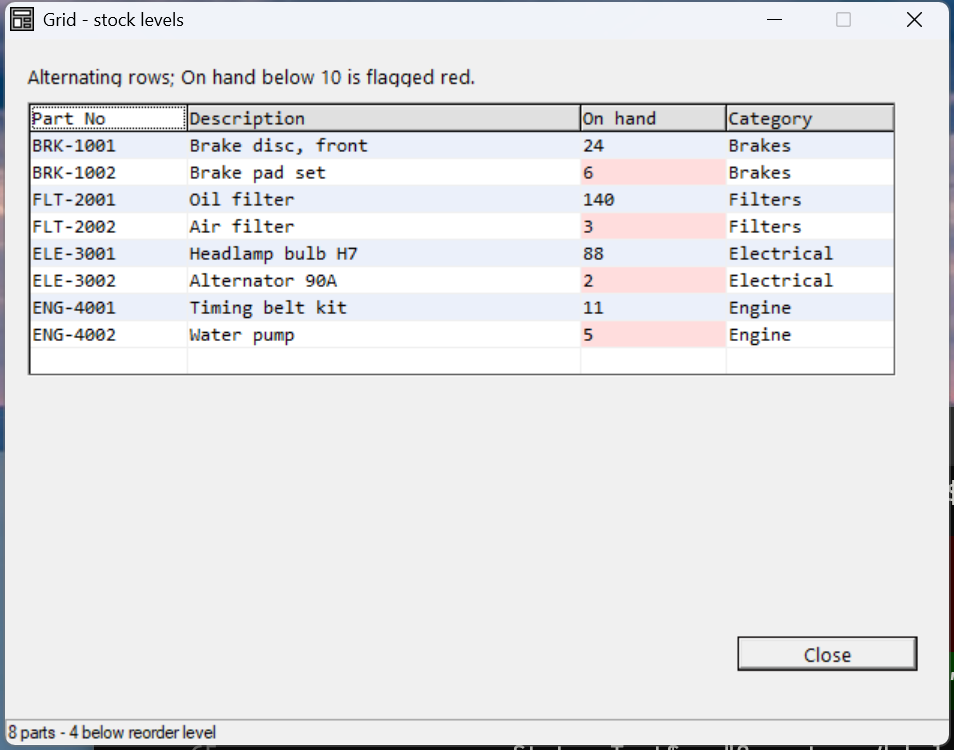
Verified by execution on KCML 06.00.88 (KClient direct mode).
What it demonstrates
- Named colours defined in the DEFFORM (
.color$). - Row-level alternating background via
Cell(row, 0).BackColor. - Cell-level conditional formatting (read the value, colour the cell).
- Cell precedence — a cell colour overrides the row colour.
The program (colours + formatting loop)
01000 REM demo_grid_colours - alternating rows + conditional low-stock highlight
    : DIM result, sv_r, sv_c, qty, qty_s$10
01010 - DEFFORM GridColours()=\
       {.form,.form$,.Style=0x50c000c4,.Width=420,.Height=290,.Text$="Grid - stock levels",.Id=1024},\
       {.grid,.KCMLgrid$,.Style=0x50013030,.Left=10,.Top=26,.Width=395,.Height=205,.Id=1000,.Rows=10,.Cols=4,.FixedRows=1,.Font=.Mono},\
       {.btnClose,.button$,.Style=0x50010001,.Left=325,.Top=245,.Width=80,.Height=14,.Text$="Close",.Id=1,.Font=.UI},\
       {.UI,.dlgfont$,.Name$="Segoe UI",.Size=10},\
       {.Mono,.dlgfont$,.Name$="Consolas",.Size=10},\
       {.clrHdr,.color$,.Red=224,.Green=224,.Blue=224},\
       {.clrAlt,.color$,.Red=235,.Green=240,.Blue=250},\
       {.clrLow,.color$,.Red=255,.Green=221,.Blue=221}
    :     + DEFEVENT GridColours.Enter()
    :         REM ... set column widths, heading row 1, and data rows 2-9 ...
    :         FOR sv_r = 2 TO 9
    :             REM stripe alternate rows (row-level colour on the row-header cell, col 0)
    :             IF MOD(sv_r,2) == 0 THEN .grid.Cell(sv_r,0).BackColor = &.clrAlt
    :             REM conditional: read On hand, flag the cell red if below reorder level
    :             qty_s$ = .grid.Cell(sv_r,3).Text$
    :             CONVERT qty_s$ TO qty
    :             IF qty < 10 THEN .grid.Cell(sv_r,3).BackColor = &.clrLow
    :         NEXT sv_r
    :     END EVENT
    : FORM END GridColours
01020 result = GridColours.Open()
    : $END
How it works
Named colours. Define each colour once in the DEFFORM as a .color$ with RGB
values, then refer to it as &.clrName. &.Default restores the system default.
Alternating rows (row level). Setting BackColor on Cell(row, 0) — the
row-header cell in column 0 — colours the whole row. Striping every even row
(MOD(sv_r,2)==0) gives the classic banded look that makes wide rows easy to
follow.
Conditional formatting (cell level). Read the cell you want to test
(Cell(r,3).Text$), CONVERT it to a number, and colour just that cell when the
rule fires. Because cell precedence is cell > row > column > grid, the red
BackColor on the On-hand cell wins over the row's alternating colour.
Verified gotcha:
.ForeColor(text colour) is listed in the reference but raisesP34.096 — undeclared field nameon this build — only.BackColortook effect for cells. Use background colour for emphasis here; if you need coloured text, drive it through a cellType$/format or a font, notForeColor.