Grid — large datasets with RowRequest()
A table of thousands of records shouldn't be loaded all at once. KCML grids
support deferred loading: you load an initial block, set DataPending = TRUE,
and the grid raises a RowRequest() event when the user scrolls near the bottom —
your handler loads the next block. This page loads 500 parts, 25 at a time.
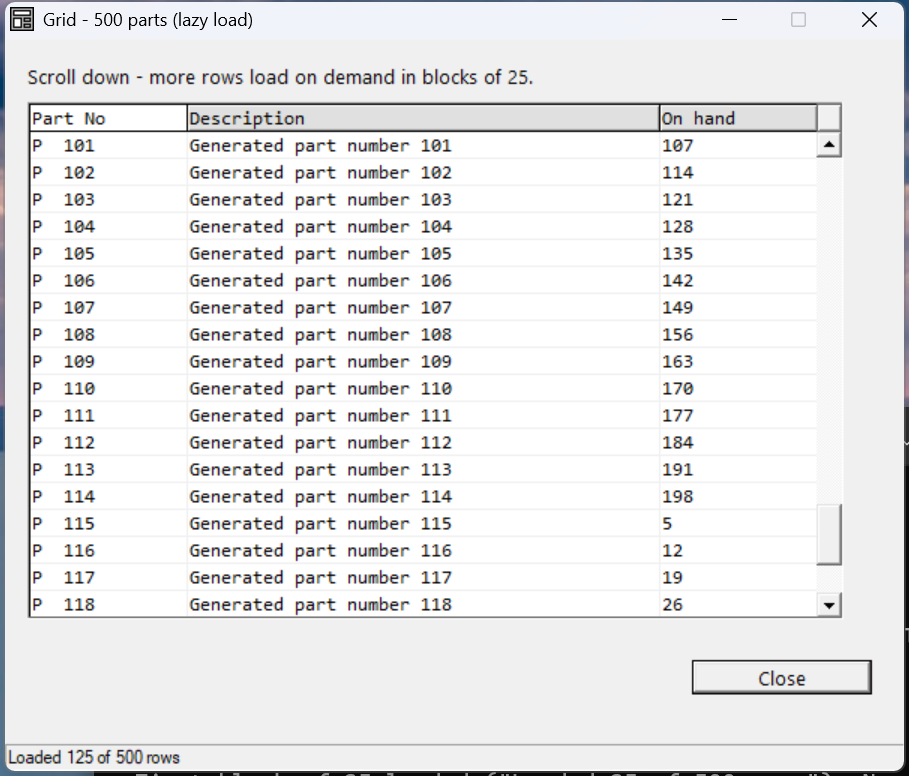
Verified by execution on KCML 06.00.88 — scrolling pulled blocks in on demand up to 125 of 500.
What it demonstrates
- Loading an initial block in
Enter(). - Signalling "more available" with
.grid.DataPending = TRUE. - Handling
RowRequest()to append the next block as the user scrolls. - Stopping cleanly by setting
DataPending = FALSEat the end.
The program
01000 REM demo_grid_large - deferred row loading with RowRequest() / DataPending
    : DIM result, loaded, total, i, blk
    : loaded = 0
    : total = 500
01010 - DEFFORM GridLarge()=\
       {.form,.form$,.Style=0x50c000c4,.Width=400,.Height=300,.Text$="Grid - 500 parts (lazy load)",.Id=1024},\
       {.grid,.KCMLgrid$,.Style=0x50013030,.Left=10,.Top=26,.Width=375,.Height=215,.Id=1000,.Rows=1,.Cols=3,.FixedRows=1,.Font=.Mono},\
       {.btnClose,.button$,.Style=0x50010001,.Left=305,.Top=255,.Width=80,.Height=14,.Text$="Close",.Id=1,.Font=.UI},\
       {.paneStatus,.status$,.Width=400,.Style=0x50000000,.Text$="Ready"},\
       {.UI,.dlgfont$,.Name$="Segoe UI",.Size=10},\
       {.Mono,.dlgfont$,.Name$="Consolas",.Size=10},\
       {.clrHdr,.color$,.Red=224,.Green=224,.Blue=224}
    :     + DEFEVENT GridLarge.Enter()
    :         .grid.Cell(0,1).ColWidth = 70
    :         .grid.Cell(0,2).ColWidth = 210
    :         .grid.Cell(0,3).ColWidth = 70
    :         .grid.Cell(1,1).Text$ = "Part No"
    :         .grid.Cell(1,2).Text$ = "Description"
    :         .grid.Cell(1,3).Text$ = "On hand"
    :         .grid.Cell(1,1).BackColor = &.clrHdr
    :         .grid.Cell(1,2).BackColor = &.clrHdr
    :         .grid.Cell(1,3).BackColor = &.clrHdr
    :         GOSUB 'LOAD_BLOCK()
    :     END EVENT
    :     + DEFEVENT GridLarge.grid.RowRequest()
    :         GOSUB 'LOAD_BLOCK()
    :     END EVENT
    : FORM END GridLarge
01020 result = GridLarge.Open()
    : $END
01500 DEFFN 'LOAD_BLOCK()
    : FOR i = 1 TO 25
    :     IF loaded < total THEN DO
    :         loaded = loaded + 1
    :         blk = GridLarge.grid.Rows + 1
    :         GridLarge.grid.Rows = blk
    :         GridLarge.grid.Cell(blk,1).Text$ = $PRINTF("P%05d", loaded)
    :         GridLarge.grid.Cell(blk,2).Text$ = $PRINTF("Generated part number %d", loaded)
    :         GridLarge.grid.Cell(blk,3).Text$ = $PRINTF("%d", MOD(loaded*7, 200))
    :     END DO
    : NEXT i
    : IF loaded < total THEN GridLarge.grid.DataPending = TRUE
    : IF loaded >= total THEN GridLarge.grid.DataPending = FALSE
    : GridLarge.paneStatus.Text$ = $PRINTF("Loaded %d of %d rows", loaded, total)
    : RETURN
How it works
The loop is in a shared subroutine. 'LOAD_BLOCK() appends up to 25 rows by
growing .grid.Rows and filling each new row. Both Enter() (first block) and
RowRequest() (subsequent blocks) GOSUB to it, so there's one place that knows
how to fetch a block. In a real app it reads the next records from a KISAM file
instead of generating them.
DataPending drives RowRequest(). Set .grid.DataPending = TRUE while more
rows remain — the grid then fires RowRequest() as the user scrolls toward the
end. When the source is exhausted, set DataPending = FALSE and the grid stops
asking. In testing, scrolling pulled blocks in until the status showed
"Loaded 125 of 500".
Referencing controls from a DEFFN. The subroutine sits outside the form
block, so it uses the full control path (GridLarge.grid…,
GridLarge.paneStatus…) rather than the .grid shorthand that only works inside
the form's own events.
Note: the row-loading guard uses
IF loaded < total THEN DO … END DOrather thanRETURNinside theFORloop — a bareRETURNinside anIF…THENraises error A07, so structure the exit with aDOblock or a flag.
See also
- grid — full reference
- Grid colours · next: Grid — row context menus