Grid — editing & dropdowns
This page makes the stock grid editable in place: click a cell and type, Tab across the row, and edit the Category column through a per-column dropdown. It builds on the Grid basics conventions.
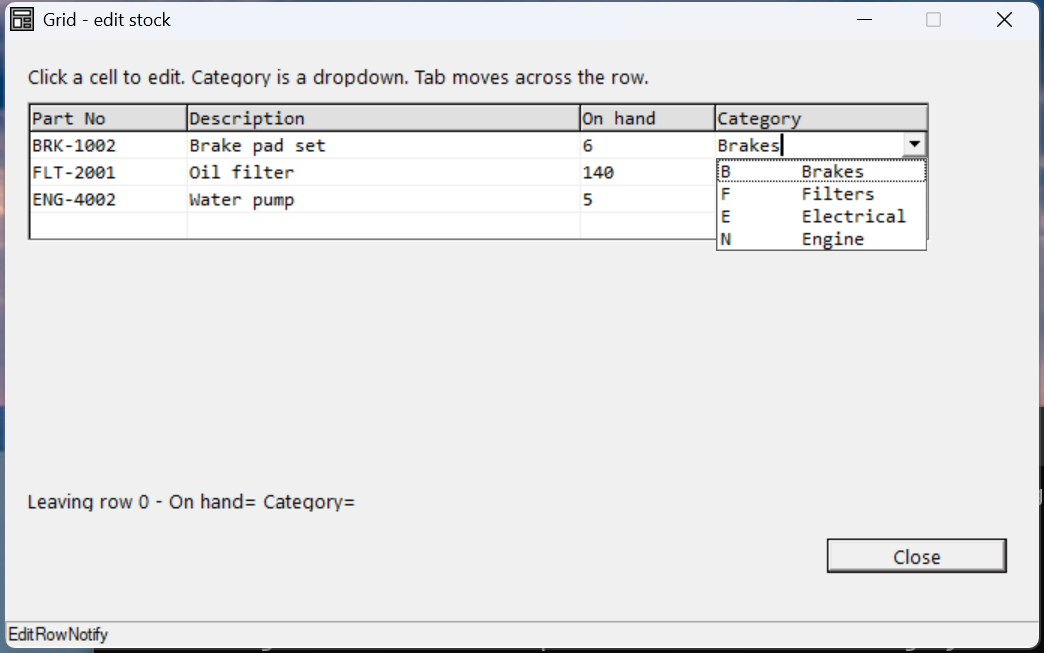
Verified by execution on KCML 06.00.88 (KClient direct mode).
What it demonstrates
- Turning on in-place editing with
AutoEdit = &.NoEditFixed. - A per-column dropdown configured on the column header cell
Cell(0, col). - The
EditRowNotify()event firing as the edit cursor leaves a row. - The
DropDown()event reporting which cell opened its list.
The program
01000 REM demo_grid_edit - editable stock grid with a per-column Category dropdown
    : DIM result, sv_c
01010 - DEFFORM GridEdit()=\
       {.form,.form$,.Style=0x50c000c4,.Width=460,.Height=250,.Text$="Grid - edit stock",.Id=1024},\
       {.grid,.KCMLgrid$,.Style=0x50013030,.Left=10,.Top=26,.Width=435,.Height=150,.Id=1000,.Rows=5,.Cols=4,.FixedRows=1,.Font=.Mono},\
       {.lblEdit,.static$,.Style=0x50000000,.Left=10,.Top=184,.Width=440,.Height=10,.Text$="(no edit yet)",.Id=2001,.Font=.UI},\
       {.btnClose,.button$,.Style=0x50010001,.Left=365,.Top=205,.Width=80,.Height=14,.Text$="Close",.Id=1,.Font=.UI},\
       {.paneStatus,.status$,.Width=460,.Style=0x50000000,.Text$="Ready"},\
       {.UI,.dlgfont$,.Name$="Segoe UI",.Size=10},\
       {.Mono,.dlgfont$,.Name$="Consolas",.Size=10},\
       {.clrHdr,.color$,.Red=224,.Green=224,.Blue=224}
    :     + DEFEVENT GridEdit.Enter()
    :         .grid.Cell(0,1).ColWidth = 70
    :         .grid.Cell(0,2).ColWidth = 175
    :         .grid.Cell(0,3).ColWidth = 60
    :         .grid.Cell(0,4).ColWidth = 95
    :         .grid.Cell(1,1).Text$ = "Part No"
    :         .grid.Cell(1,2).Text$ = "Description"
    :         .grid.Cell(1,3).Text$ = "On hand"
    :         .grid.Cell(1,4).Text$ = "Category"
    :         FOR sv_c = 1 TO 4
    :             .grid.Cell(1,sv_c).BackColor = &.clrHdr
    :         NEXT sv_c
    :         .grid.Cell(2,1).Text$ = "BRK-1002"
    :         .grid.Cell(2,2).Text$ = "Brake pad set"
    :         .grid.Cell(2,3).Text$ = "6"
    :         .grid.Cell(2,4).Text$ = "Brakes"
    :         REM ... rows 3-4: FLT-2001 / Oil filter, ENG-4002 / Water pump ...
    :         REM Category (col 4) edits via a dropdown - configured on the HEADER cell (row 0)
    :         .grid.Cell(0,4).DropDown = &.DropAlways
    :         .grid.Cell(0,4).DropStyle = &.DropDown
    :         .grid.Cell(0,4).Add("Brakes","B")
    :         .grid.Cell(0,4).Add("Filters","F")
    :         .grid.Cell(0,4).Add("Electrical","E")
    :         .grid.Cell(0,4).Add("Engine","N")
    :         .grid.Cell(0,4).DropDownFilled = TRUE
    :         REM enable in-place editing of all non-fixed cells
    :         .grid.AutoEdit = &.NoEditFixed
    :     END EVENT
    :     + DEFEVENT GridEdit.grid.EditRowNotify()
    :         .lblEdit.Text$ = $PRINTF("Leaving row %d - On hand=%s Category=%s", ..CursorRow, RTRIM(..Cell(..CursorRow,3).Text$), RTRIM(..Cell(..CursorRow,4).Text$))
    :     END EVENT
    :     + DEFEVENT GridEdit.grid.DropDown()
    :         .paneStatus.Text$ = $PRINTF("DropDown on row %d col %d", ..CursorRow, ..CursorCol)
    :     END EVENT
    : FORM END GridEdit
01020 result = GridEdit.Open()
    : $END
How it works
Turn on editing. Set AutoEdit = &.NoEditFixed at the grid level — every
non-fixed cell becomes editable on click, the heading row stays protected. (The
other modes are &.AutoEditOff, &.AutoEditOn and &.ServerEdit.)
Per-column dropdown — configure it on the header cell. The dropdown for a
whole column lives on Cell(0, col): set DropDown = &.DropAlways and
DropStyle = &.DropDown, add the items with Cell(0,col).Add(text$, tag$), then
set DropDownFilled = TRUE. The client finds the list by walking
cell → row → column → grid, so putting it on the column header makes every data
cell in that column edit through it. (You can also populate the list lazily in
the DropDown() event — useful when the choices depend on the row.)
Edit events. EditRowNotify() fires as the cursor leaves a row — the place
to save that row to your data store (CursorRow = current, NewRow =
destination; return FALSE to block the move). EditValidate() fires per cell
with the proposed value in ValidateText$, and EndEdit() when the session ends.
Verified gotcha:
.grid.TabThrough = TRUEraisesS24.081 — attempting to assign a read-only variableon this build. Set Tab-navigation behaviour through the grid's style/AutoEdit configuration rather than assigningTabThroughat runtime.
See also
- grid — full reference
- Grid basics · next: Grid colours & formatting