Grid — row context menus
Right-clicking a row to act on it — View details, Adjust stock, Delete line — is a standard list interaction. This page adds a context menu to the stock grid: right-click selects the row and pops a menu positioned at the cursor.
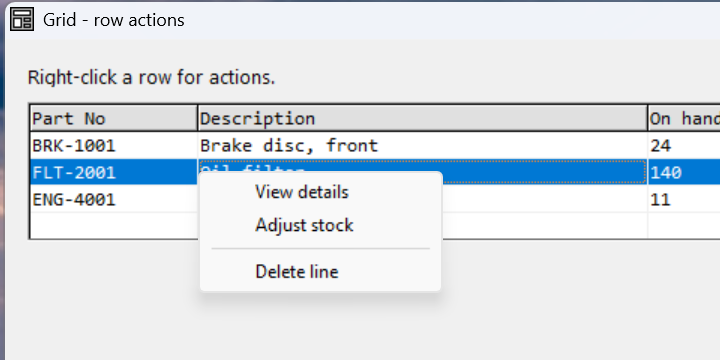
Verified by execution on KCML 06.00.88 (KClient direct mode).
What it demonstrates
- Enabling right-click on cells (
RightAction) and whole-row selection (RightSelect). - Handling
RightClick(): capture the row, thenTrackPopup()the menu at the cursor. - A popup
.Menu$with a separator and per-itemSelect()handlers.
The program
01000 REM demo_grid_context - right-click a stock row for a context menu
    : DIM result, sv_r, sv_c, sel_part$15
01010 - DEFFORM GridCtx()=\
       {.form,.form$,.Style=0x50c000c4,.Width=460,.Height=250,.Text$="Grid - row actions",.Id=1024},\
       {.ctxMenu,.Menu$,.Style=0x01,.Id=101,\
            .ctxView={.Text$="View details"},\
            .ctxAdjust={.Text$="Adjust stock"},\
            .ctxSep={.Flag=2048},\
            .ctxDelete={.Text$="Delete line"}},\
       {.grid,.KCMLgrid$,.Style=0x50013030,.Left=10,.Top=26,.Width=435,.Height=150,.Id=1000,.Rows=5,.Cols=3,.FixedRows=1,.Font=.Mono},\
       {.lblLast,.static$,.Style=0x50000000,.Left=10,.Top=184,.Width=440,.Height=10,.Text$="(no action yet)",.Id=2001,.Font=.UI},\
       {.btnClose,.button$,.Style=0x50010001,.Left=365,.Top=205,.Width=80,.Height=14,.Text$="Close",.Id=1,.Font=.UI},\
       {.UI,.dlgfont$,.Name$="Segoe UI",.Size=10},\
       {.Mono,.dlgfont$,.Name$="Consolas",.Size=10},\
       {.clrHdr,.color$,.Red=224,.Green=224,.Blue=224}
    :     + DEFEVENT GridCtx.Enter()
    :         REM ... headings (row 1) + data rows 2-4 ...
    :         FOR sv_r = 2 TO 4
    :             FOR sv_c = 1 TO 3
    :                 .grid.Cell(sv_r,sv_c).RightAction = &.Click
    :             NEXT sv_c
    :         NEXT sv_r
    :         .grid.RightSelect = &.Row
    :     END EVENT
    :     + DEFEVENT GridCtx.grid.RightClick()
    :         IF ..CursorRow > 1 THEN DO
    :             sel_part$ = RTRIM(..Cell(..CursorRow,1).Text$)
    :             .ctxMenu.TrackPopup(..MouseX + ..Left, ..MouseY + ..Top)
    :         END DO
    :     END EVENT
    :     + DEFEVENT GridCtx.ctxMenu.ctxView.Select()
    :         .lblLast.Text$ = "View details - " & sel_part$
    :     END EVENT
    :     + DEFEVENT GridCtx.ctxMenu.ctxDelete.Select()
    :         .lblLast.Text$ = "Delete line - " & sel_part$
    :     END EVENT
    : FORM END GridCtx
01020 result = GridCtx.Open()
    : $END
How it works
Enable right-click. Set RightAction = &.Click on each data cell and
RightSelect = &.Row so a right-click both highlights the row and raises
RightClick() — mirroring the left-click setup from Grid basics.
Capture, then pop. In RightClick(), read ..CursorRow first and stash
what you need (here the part number) into a variable — the menu's Select()
handlers run later and need that context. Then call
.ctxMenu.TrackPopup(x, y). Converting the grid-relative ..MouseX/..MouseY
to form coordinates by adding the grid's ..Left/..Top puts the menu right at
the cursor.
The menu. A .Menu$ with .Style=0x01 is a free-standing popup. Items are
listed flat; .Flag=2048 inserts a separator. Each item has its own Select()
event — which uses the sel_part$ captured at right-click time.
TrackPopupis modal — it blocks until the user picks an item or clicks away — so you can rely on the row context still being valid when aSelect()handler runs.
See also
- grid · Menus worked example · TrackPopup
- Back to Grid basics