Menus — worked example
KCML menus (.Menu$) cover both the menu bar at
the top of a form and context (popup) menus. Items are declared flat and a
.Flag value on each item encodes the hierarchy — which items open a submenu,
which close it, and where the separators go.
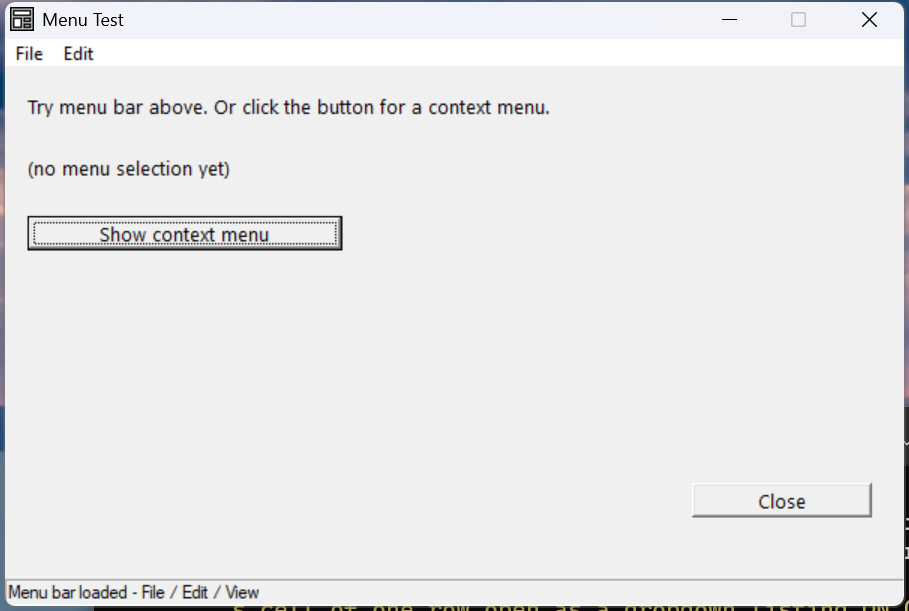
Verified by execution on KCML 06.00.88 (KClient direct mode).
What it demonstrates
- A menu bar attached to the form with
.Menu=.menuBar. - The flat item list with
.Flaghierarchy codes. - A separate context menu (
.Style=0x01) shown with.TrackPopup(x, y). - Per-item
Select()events, a checked/toggle item, and accelerator keys (&).
The program (key parts)
01010 - DEFFORM MenuTest()=\
       {.form,.form$,.Style=0x50c000c4,.Width=400,.Height=220,.Text$="Menu Test",.Id=1024,.Menu=.menuBar},\
       {.menuBar,.Menu$,.Id=100,\
            .mnuFile={.Flag=16,.Text$="&File"},\
            .mnuNew={.Text$="&New"},\
            .mnuOpen={.Text$="&Open"},\
            .mnuFsep={.Flag=2048},\
            .mnuExit={.Flag=128,.Text$="E&xit"},\
            .mnuEdit={.Flag=144,.Text$="&Edit"},\
            .mnuCopy={.Text$="&Copy"},\
            .mnuPaste={.Flag=128,.Text$="&Paste"},\
            .mnuView={.Flag=144,.Text$="&View"},\
            .mnuToggleHi={.Flag=128,.Text$="Toggle &Highlight"}},\
       {.ctxMenu,.Menu$,.Style=0x01,.Id=101,\
            .ctxA={.Text$="Context A"},\
            .ctxB={.Text$="Context B"},\
            .ctxSep={.Flag=2048},\
            .ctxC={.Text$="Context C"}},\
       {.btnPopup,.button$,.Style=0x50010000,.Left=10,.Top=60,.Width=140,.Height=14,.Text$="Show context menu",.Id=2002,.Font=.SegoeCtl},\
       {.btnClose,.button$,.Style=0x50010001,.Left=305,.Top=170,.Width=80,.Height=14,.Text$="Close",.Id=1,.Font=.SegoeCtl},\
       {.paneStatus,.status$,.Width=400,.Style=0x50000000,.Text$="Ready"},\
       {.SegoeCtl,.dlgfont$,.Name$="Segoe UI",.Size=10}
    :     + DEFEVENT MenuTest.btnPopup.Click()
    :         .ctxMenu.TrackPopup(30, 90)
    :     END EVENT
    :     + DEFEVENT MenuTest.menuBar.mnuNew.Select()
    :         .lblLast.Text$ = "File > New"
    :     END EVENT
    :     + DEFEVENT MenuTest.menuBar.mnuExit.Select()
    :         .form.Terminate(0)
    :     END EVENT
    :     + DEFEVENT MenuTest.menuBar.mnuToggleHi.Select()
    :         IF ..Checked == 1 THEN ..Checked = 0
    :         IF ..Checked == 0 THEN ..Checked = 1   REM toggle the tick
    :     END EVENT
    : FORM END MenuTest
How it works
Flat items, .Flag hierarchy. All menu items are listed at one level inside
.Menu$. The .Flag value builds the tree:
.Flag |
Meaning |
|---|---|
16 |
Start of a popup (this item is a top-level menu like File) |
128 |
End of the current popup (last item in that menu) |
144 |
Close the current popup and start a new one (next top-level menu) |
2048 |
Separator line |
So File opens with 16, its last item Exit closes with 128, then Edit
both closes File's group and starts its own with 144.
Flat addressing. Even though menus nest visually, you address items flat off
the menu: MenuTest.menuBar.mnuNew.Select() — not …mnuFile.mnuNew.
Menu bar vs context menu. Attach a bar to the form with .Menu=.menuBar. A
context menu is just a .Menu$ with .Style=0x01; show it on demand with
.TrackPopup(x, y) (e.g. from a button or a RightClick() handler).
Accelerators and checks. & in an item's Text$ sets its Alt-key shortcut.
For a toggleable item, flip ..Checked in its Select() handler to show/hide
the tick.
See also
- Menus reference · TrackPopup
- Picture Button worked example — context menu from a right-click