Radio buttons & Group Box — worked example
Radio buttons present a set of mutually-exclusive choices — selecting one clears the others in its group. A group box draws the labelled frame around them.
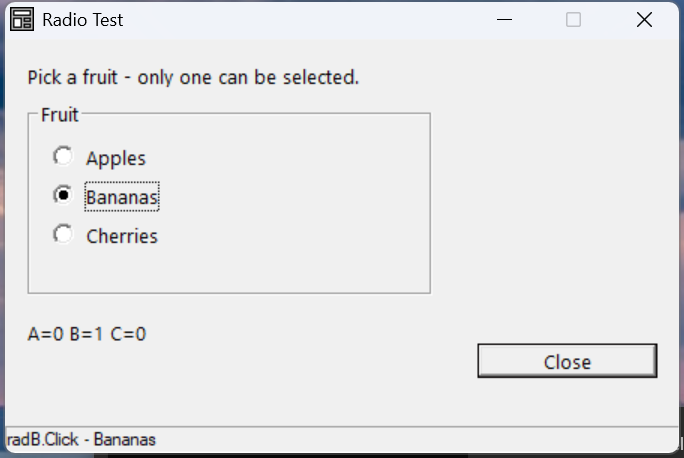
Verified by execution on KCML 06.00.88 (KClient direct mode).
What it demonstrates
- Grouping radios with
.ButtonGroup=.grpnameso they act as one set. - Pre-selecting a button with
.State=1at definition time. - A
.groupbox$container with a caption. - Reading
.Stateper button in eachClick()handler.
The program
01000 REM test_radio - three radio buttons in a button group
    : REM Vendor token is .radio$ (NOT .radiobutton$); group via .ButtonGroup
    : DIM result, msg$80
01010 - DEFFORM RadioTest()=\
       {.form,.form$,.Style=0x50c000c4,.Width=300,.Height=170,.Text$="Radio Test",.Id=1024},\
       {.lblInfo,.static$,.Style=0x50000000,.Left=10,.Top=10,.Width=280,.Height=10,.Text$="Pick a fruit - only one can be selected.",.Id=2000,.Font=.SegoeCtl},\
       {.grpFruitBox,.groupbox$,.Style=0x50000007,.Left=10,.Top=25,.Width=180,.Height=80,.Text$="Fruit",.Id=2001,.Font=.SegoeCtl},\
       {.radA,.radio$,.Style=0x50010004,.Left=20,.Top=42,.Width=160,.Height=13,.Text$="Apples",.Id=2010,.State=1,.ButtonGroup=.grpFruit,.Font=.SegoeCtl},\
       {.radB,.radio$,.Style=0x50010004,.Left=20,.Top=58,.Width=160,.Height=13,.Text$="Bananas",.Id=2011,.ButtonGroup=.grpFruit,.Font=.SegoeCtl},\
       {.radC,.radio$,.Style=0x50010004,.Left=20,.Top=74,.Width=160,.Height=13,.Text$="Cherries",.Id=2012,.ButtonGroup=.grpFruit,.Font=.SegoeCtl},\
       {.lblPick,.static$,.Style=0x50000000,.Left=10,.Top=115,.Width=280,.Height=10,.Text$="A=1 B=0 C=0",.Id=2020,.Font=.SegoeCtl},\
       {.btnClose,.button$,.Style=0x50010001,.Left=210,.Top=125,.Width=80,.Height=14,.Text$="Close",.Id=1,.Font=.SegoeCtl},\
       {.paneStatus,.status$,.Width=300,.Style=0x50000000,.Text$="Ready"},\
       {.SegoeCtl,.dlgfont$,.Name$="Segoe UI",.Size=10}
    :     + DEFEVENT RadioTest.radA.Click()
    :         .lblPick.Text$ = $PRINTF("A=%d B=%d C=%d", .radA.State, .radB.State, .radC.State)
    :     END EVENT
    :     + DEFEVENT RadioTest.radB.Click()
    :         .lblPick.Text$ = $PRINTF("A=%d B=%d C=%d", .radA.State, .radB.State, .radC.State)
    :     END EVENT
    :     + DEFEVENT RadioTest.radC.Click()
    :         .lblPick.Text$ = $PRINTF("A=%d B=%d C=%d", .radA.State, .radB.State, .radC.State)
    :     END EVENT
    : FORM END RadioTest
01020 result = RadioTest.Open()
    : $END
How it works
Grouping. Every radio in the set shares the same .ButtonGroup=.grpFruit
tag. That mutual exclusion is what makes selecting Bananas clear Apples — the
readout flips from A=1 B=0 C=0 to A=0 B=1 C=0 with no code on your part.
The token is .radio$ — not .radiobutton$. Use style 0x50010004
(BS_AUTORADIOBUTTON), which handles the auto-clearing within the group.
The group box is just a frame. .groupbox$ draws the caption and border; it
does not itself group the radios — .ButtonGroup does. Place the radios
visually inside it for the expected look.
Pre-selection. Set .State=1 on one button at definition time (here Apples)
so the form opens with a default choice.
See also
- radio · groupbox — full reference
- Checkbox worked example — independent toggles