Checkbox — worked example
A checkbox is an independent on/off toggle. KCML checkboxes can also be three-state (on / off / indeterminate), and their text can sit on either side of the box.
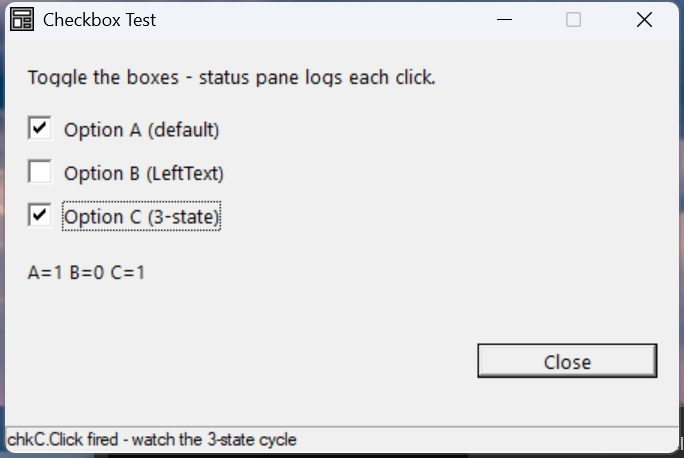
Verified by execution on KCML 06.00.88 (KClient direct mode).
What it demonstrates
- Reading each box's
.Statein itsClick()event. - A normal two-state box vs a three-state box (
Style0x50010005=BS_AUTO3STATE), whose.Statecycles0 → 1 → 2. - The
.LeftTextproperty (text on the left of the box).
The program
01000 REM test_checkbox - two checkboxes plus a three-state box
    : DIM result, msg$80
01010 - DEFFORM CheckTest()=\
       {.form,.form$,.Style=0x50c000c4,.Width=300,.Height=170,.Text$="Checkbox Test",.Id=1024},\
       {.lblInfo,.static$,.Style=0x50000000,.Left=10,.Top=10,.Width=280,.Height=10,.Text$="Toggle the boxes - status pane logs each click.",.Id=2000,.Font=.SegoeCtl},\
       {.chkA,.checkbox$,.Style=0x50010002,.Left=10,.Top=30,.Width=180,.Height=13,.Text$="Option A (default)",.Id=2001,.Font=.SegoeCtl},\
       {.chkB,.checkbox$,.Style=0x50010002,.Left=10,.Top=48,.Width=180,.Height=13,.Text$="Option B (LeftText)",.Id=2002,.LeftText=1,.Font=.SegoeCtl},\
       {.chkC,.checkbox$,.Style=0x50010005,.Left=10,.Top=66,.Width=180,.Height=13,.Text$="Option C (3-state)",.Id=2003,.Font=.SegoeCtl},\
       {.lblA,.static$,.Style=0x50000000,.Left=10,.Top=90,.Width=280,.Height=10,.Text$="A=0 B=0 C=0",.Id=2010,.Font=.SegoeCtl},\
       {.btnClose,.button$,.Style=0x50010001,.Left=210,.Top=125,.Width=80,.Height=14,.Text$="Close",.Id=1,.Font=.SegoeCtl},\
       {.paneStatus,.status$,.Width=300,.Style=0x50000000,.Text$="Ready"},\
       {.SegoeCtl,.dlgfont$,.Name$="Segoe UI",.Size=10}
    :     + DEFEVENT CheckTest.chkA.Click()
    :         .lblA.Text$ = $PRINTF("A=%d B=%d C=%d", .chkA.State, .chkB.State, .chkC.State)
    :     END EVENT
    :     + DEFEVENT CheckTest.chkB.Click()
    :         .lblA.Text$ = $PRINTF("A=%d B=%d C=%d", .chkA.State, .chkB.State, .chkC.State)
    :     END EVENT
    :     + DEFEVENT CheckTest.chkC.Click()
    :         .lblA.Text$ = $PRINTF("A=%d B=%d C=%d", .chkA.State, .chkB.State, .chkC.State)
    :     END EVENT
    : FORM END CheckTest
01020 result = CheckTest.Open()
    : $END
How it works
Reading state. .State is 0 (unchecked) or 1 (checked) for a normal box.
Each box gets its own Click() handler; here all three rebuild the same readout
label so you can watch the values change live.
Three-state boxes. Give the box BS_AUTO3STATE (0x50010005) and .State
cycles 0 → 1 → 2, where 2 is the greyed indeterminate state — useful for
"mixed" selections or "no opinion" options.
.LeftText. Set .LeftText=1 to render the caption to the left of the tick
box rather than the right.
See also
- checkbox — full reference
- Radio button worked example — mutually-exclusive choices