Picture Button — worked example
A picture button (.picbutton$) is a clickable
image. It behaves like a button but can show a bitmap, reports the click
coordinates, and is a natural place to hang a right-click context menu.
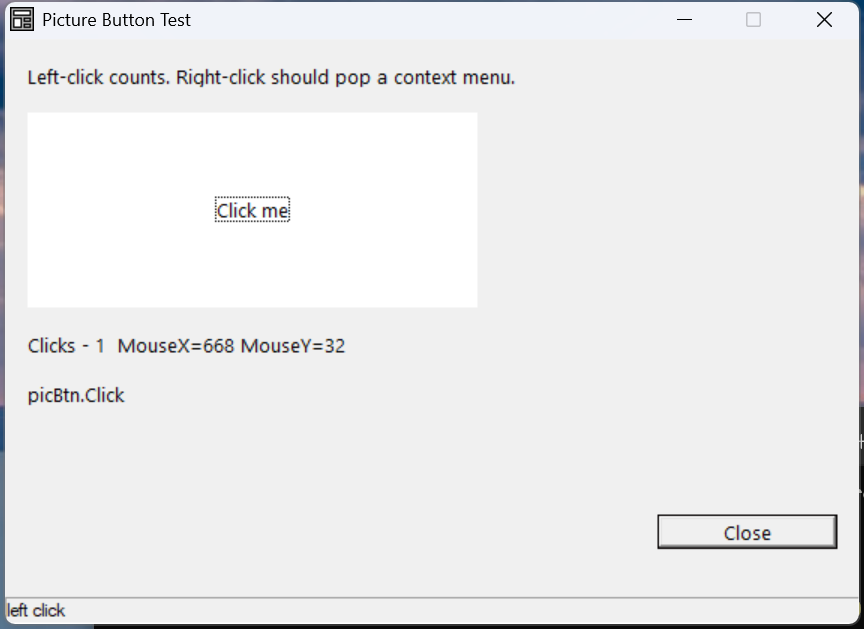
Verified by execution on KCML 06.00.88 (KClient direct mode).
What it demonstrates
- A
.picbutton$with aClick()handler counting clicks. - Reading the click position from
.MouseX/.MouseY(relative to the control). - A
RightClick()handler that pops a context menu with.TrackPopup().
The program
01000 REM test_picbutton - picture button with Click + RightClick context menu
    : DIM result, msg$80, click_count
    : click_count = 0
01010 - DEFFORM PicTest()=\
       {.form,.form$,.Style=0x50c000c4,.Width=380,.Height=240,.Text$="Picture Button Test",.Id=1024},\
       {.ctxMenu,.Menu$,.Style=0x01,.Id=101,\
            .ctxA={.Text$="Context A"},\
            .ctxB={.Text$="Context B"},\
            .ctxSep={.Flag=2048},\
            .ctxC={.Text$="Context C"}},\
       {.picBtn,.picbutton$,.Style=0x5001000b,.Left=10,.Top=30,.Width=200,.Height=80,.Text$="Click me",.Id=2001,.Font=.SegoeCtl},\
       {.lblCount,.static$,.Style=0x50000000,.Left=10,.Top=120,.Width=360,.Height=10,.Text$="Clicks - 0",.Id=2002,.Font=.SegoeCtl},\
       {.btnClose,.button$,.Style=0x50010001,.Left=290,.Top=195,.Width=80,.Height=14,.Text$="Close",.Id=1,.Font=.SegoeCtl},\
       {.paneStatus,.status$,.Width=380,.Style=0x50000000,.Text$="Ready"},\
       {.SegoeCtl,.dlgfont$,.Name$="Segoe UI",.Size=10}
    :     + DEFEVENT PicTest.picBtn.Click()
    :         click_count = click_count + 1
    :         .lblCount.Text$ = $PRINTF("Clicks - %d  MouseX=%d MouseY=%d", click_count, .picBtn.MouseX, .picBtn.MouseY)
    :     END EVENT
    :     + DEFEVENT PicTest.picBtn.RightClick()
    :         .ctxMenu.TrackPopup(..MouseX + ..Left, ..MouseY + ..Top)
    :     END EVENT
    :     + DEFEVENT PicTest.ctxMenu.ctxA.Select()
    :         .lblCount.Text$ = "ctxMenu.ctxA picked"
    :     END EVENT
    : FORM END PicTest
01020 result = PicTest.Open()
    : $END
How it works
Showing an image. Add .Picture$="path/to/img.bmp" to put a bitmap on the
button; .PictureAlignment positions it. With no picture set (as above) the
control still works and shows its Text$.
Click coordinates. Inside Click(), .MouseX / .MouseY give the click
position relative to the control — useful for hot-spots or image maps. Here we
just display them.
Right-click context menu. Define a menu with .Menu$ (style 0x01 = a
popup menu), then in RightClick() call .ctxMenu.TrackPopup(x, y) to show it
at the cursor. Adding the control's .Left/.Top to the relative ..MouseX/
..MouseY converts to the form coordinates TrackPopup expects. Each item has
its own Select() event.
See also
- picbutton · Picture$ — full reference
- Menus worked example — TrackPopup and menu items in depth
- Button worked example