Button — worked example
The button control is the most common form control, but the reference page only lists its properties and events. This page shows a small, complete program you can run, what it looks like on screen, and how the key properties and events actually behave.
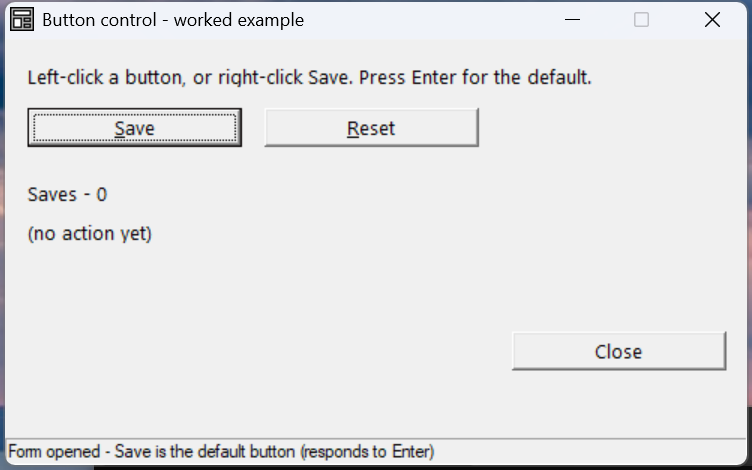
Verified by execution on KCML 06.00.88 (KClient direct mode).
What it demonstrates
- A default button (
Save) — note the heavier border; it fires when you press Enter. - Accelerator keys —
&Save/&Resetunderline the S and R; Alt+S / Alt+R activate them. - The
Click()event updating a counter and labels. - The
RightClick()event — a separate handler on the same button.
The program
01000 REM demo_button - worked example for the Button control
    : DIM result, save_count, msg$80
    : save_count = 0
01010 - DEFFORM ButtonDemo()=\
       {.form,.form$,.Style=0x50c000c4,.Width=330,.Height=175,.Text$="Button control - worked example",.Id=1024},\
       {.lblInfo,.static$,.Style=0x50000000,.Left=10,.Top=10,.Width=310,.Height=10,.Text$="Left-click a button, or right-click Save. Press Enter for the default.",.Id=2000,.Font=.Segoe},\
       {.btnSave,.button$,.Style=0x50010001,.Left=10,.Top=28,.Width=95,.Height=16,.Text$="&Save",.Id=2001,.Font=.Segoe},\
       {.btnReset,.button$,.Style=0x50010000,.Left=115,.Top=28,.Width=95,.Height=16,.Text$="&Reset",.Id=2002,.Font=.Segoe},\
       {.lblCount,.static$,.Style=0x50000000,.Left=10,.Top=58,.Width=310,.Height=10,.Text$="Saves - 0",.Id=2003,.Font=.Segoe},\
       {.lblLast,.static$,.Style=0x50000000,.Left=10,.Top=74,.Width=310,.Height=10,.Text$="(no action yet)",.Id=2004,.Font=.Segoe},\
       {.btnClose,.button$,.Style=0x50010000,.Left=225,.Top=120,.Width=95,.Height=16,.Text$="Close",.Id=1,.Font=.Segoe},\
       {.paneStatus,.status$,.Width=330,.Style=0x50000000,.Text$="Ready"},\
       {.Segoe,.dlgfont$,.Name$="Segoe UI",.Size=10}
    :     + DEFEVENT ButtonDemo.Enter()
    :         .paneStatus.Text$ = "Form opened - Save is the default button (responds to Enter)"
    :     END EVENT
    :     + DEFEVENT ButtonDemo.btnSave.Click()
    :         save_count = save_count + 1
    :         .lblCount.Text$ = $PRINTF("Saves - %d", save_count)
    :         .lblLast.Text$ = "Last - Save clicked (Click event)"
    :         .paneStatus.Text$ = "btnSave.Click fired"
    :     END EVENT
    :     + DEFEVENT ButtonDemo.btnReset.Click()
    :         save_count = 0
    :         .lblCount.Text$ = "Saves - 0"
    :         .lblLast.Text$ = "Last - Reset clicked (Click event)"
    :         .paneStatus.Text$ = "btnReset.Click fired"
    :     END EVENT
    :     + DEFEVENT ButtonDemo.btnSave.RightClick()
    :         .lblLast.Text$ = "Last - Save RIGHT-clicked (RightClick event)"
    :         .paneStatus.Text$ = "btnSave.RightClick fired"
    :     END EVENT
    : FORM END ButtonDemo
01020 result = ButtonDemo.Open()
    : PRINT "closed result="; result; " saves="; save_count
    : $END
How it works
Making Save the default button. The button .Style ends in ...1
(0x50010001) which sets BS_DEFPUSHBUTTON — this draws the heavier border and
makes the button respond to Enter. Only one button per form should be the
default. The other buttons use 0x50010000.
Accelerator keys. Put an & in the button Text$ before the letter you want
as the shortcut: "&Save" underlines S and binds Alt+S. See also the
Key property for assigning an accelerator without changing
the visible text.
Click vs RightClick. Each is a separate DEFEVENT on the control. Note the
events must be continuation lines inside the DEFFORM block, each prefixed
with + — a DEFEVENT placed outside the block is silently ignored and the
button appears to do nothing.
Gotcha — read values before the form closes
Harvest anything you need into ordinary variables inside the events, while the
form is open. Once .Open() returns, the form's components are destroyed, and
referencing ButtonDemo.btnSave... after close raises
P34.101 Missing component. That is why save_count is a plain DIM'd variable
updated in the Click event, not read from the control afterwards.
See also
- button — full property/event reference
- Click() event · RightClick() event
- Default · Key · TextAlignment