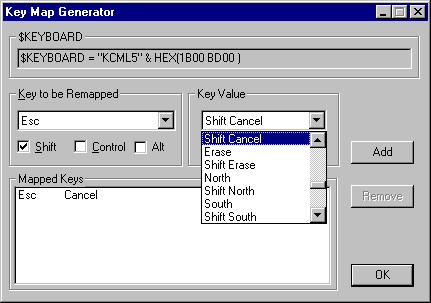
$KEYBOARD keymap generator
The utility editkb.exe is shipped with windows versions of KCML. If found it will be automatically added to the Workbench menus. It can be used to generate interactively a mapping string for the $KEYBOARD statement that can be pasted into a program in the Workbench
Choose the key to be remapped from the left hand combo box, check any shift state required and pick the KCML virtual key that is the target of the mapping. Clicking the Add button will add that mapping to the $KEYBOARD statement that is being built up in the read-only text box at the top of the dialog. If you make a mistake and want to unmap something then select that mapping from the listbox at the bottom and click the Remove button.
When done you can select the contents of the $KEYBOARD string and copy it to the clipboard with CTRL-C then switch back to the Workbench and paste it into the program with CTRL-V.