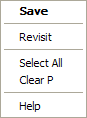
The default in this case is Revisit you can click again or press RETURN to get the same effect as the old right double click. This is the default context menu, displayed when no others can apply.
The options on the menu are
| Save | Save the current file. |
|---|---|
| Revisit | This will move the editor view back to the previous entry in the visit chain. Example: if you use the definition option for this menu to jump off to a function definition you can use revisit to jump back to where you came from. |
| Select All | Select all the text in current file. |
| Clear P | Will perform a Clear P. |
| Help | Will display the help. |