This dialog allows extra options to be set for a trap. These options can also be set with the immediate mode TRAP statement. The dialog is invoked by clicking on an existing trap listed in the traps window.
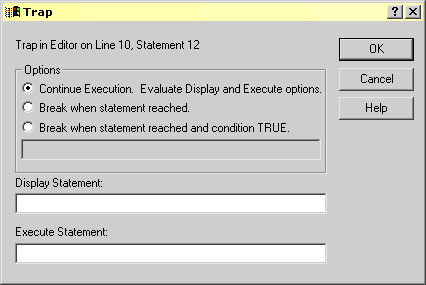
The options available are
| Continue radio button | If set then when KCML reaches the trap its display and execute options, if any, will be evaluated but execution will continue. |
| Break radio button | If set then when KCML reaches the trap its display and execute options, if any, will be evaluated and execution will stop with control returned to the Workbench. |
| Break on condition radio button | If set then you must fill in a boolean expression in the edit box below the button. When KCML reaches the trap it will evaluate the expression and if TRUE execution will stop and control will be given back to the Workbench. If the expression is FALSE then execution will continue. The display and execute options are only evaluated if the break condition was TRUE. |
| Display | If an expression is entered into this text box it will be evaluated and the result displayed in the evaluate window when the trap fires. You can type anything that is legal in the body of a PRINT statement. To evaluate multiple items separate them with semicolons as you would in PRINT. |
| Execute | If an expression is entered into this text box it will be evaluated when the trap occurs. Any legal programmable KCML statement may be used. |