Tree Control — worked example
A tree control (.tree$) shows hierarchical data the
user can expand and collapse — folders, org charts, bills of materials, drill-down
navigation. Nodes are added by id: each Add returns an id you use as the
parent for its children.
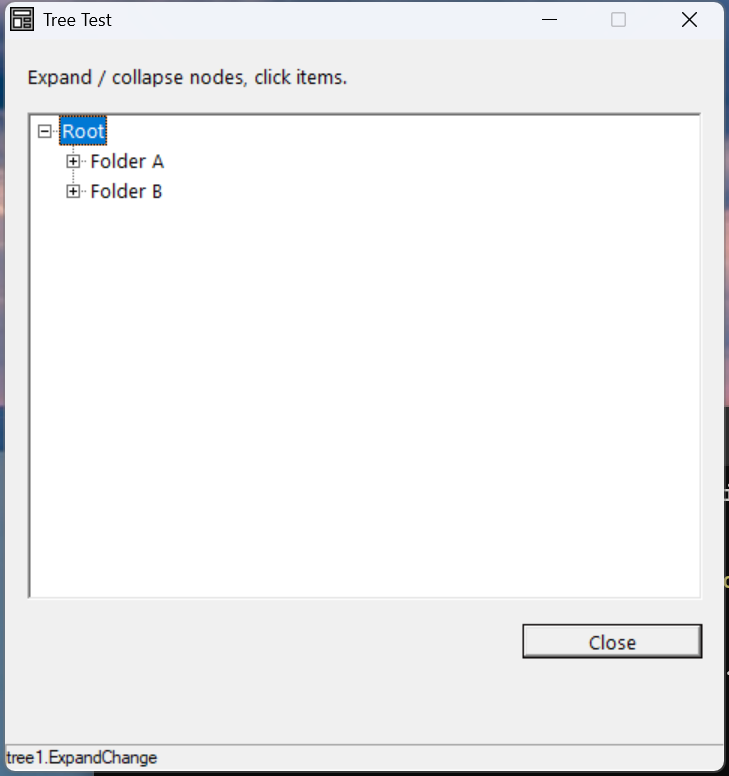
Verified by execution on KCML 06.00.88 (KClient direct mode).
What it demonstrates
- Adding a root with
.Add(text$, iconIndex), which returns the new node id. - Adding children under a node with
.Item(parentId).Add(...). - Styling a node (
.Item(id).Bold = 1) and expanding programmatically (.Item(id).Expand()). - The
LeftClick(),SelChange()andExpandChange()events.
The program
01000 REM test_tree - tree control with Root / Folder / Leaf hierarchy
    : DIM result, msg$80, root_id, folder_a, folder_b, leaf_id
01010 - DEFFORM TreeTest()=\
       {.form,.form$,.Style=0x50c000c4,.Width=320,.Height=300,.Text$="Tree Test",.Id=1024},\
       {.lblInfo,.static$,.Style=0x50000000,.Left=10,.Top=10,.Width=300,.Height=10,.Text$="Expand / collapse nodes, click items.",.Id=2000,.Font=.SegoeCtl},\
       {.tree1,.tree$,.Style=0x50810007,.Left=10,.Top=30,.Width=300,.Height=200,.Id=2001,.Font=.SegoeCtl},\
       {.btnClose,.button$,.Style=0x50010001,.Left=230,.Top=240,.Width=80,.Height=14,.Text$="Close",.Id=1,.Font=.SegoeCtl},\
       {.paneStatus,.status$,.Width=320,.Style=0x50000000,.Text$="Ready"},\
       {.SegoeCtl,.dlgfont$,.Name$="Segoe UI",.Size=10}
    :     + DEFEVENT TreeTest.Enter()
    :         root_id = .tree1.Add("Root",3)
    :         folder_a = .tree1.Item(root_id).Add("Folder A",3)
    :         leaf_id = .tree1.Item(folder_a).Add("Leaf A.1",0)
    :         leaf_id = .tree1.Item(folder_a).Add("Leaf A.2",0)
    :         folder_b = .tree1.Item(root_id).Add("Folder B",3)
    :         leaf_id = .tree1.Item(folder_b).Add("Leaf B.1 (bold)",0)
    :         .tree1.Item(leaf_id).Bold = 1
    :         leaf_id = .tree1.Item(folder_b).Add("Leaf B.2",0)
    :         .tree1.Item(root_id).Expand()
    :     END EVENT
    :     + DEFEVENT TreeTest.tree1.LeftClick()
    :         .paneStatus.Text$ = "tree1.LeftClick"
    :     END EVENT
    :     + DEFEVENT TreeTest.tree1.SelChange()
    :         .paneStatus.Text$ = "tree1.SelChange"
    :     END EVENT
    :     + DEFEVENT TreeTest.tree1.ExpandChange()
    :         .paneStatus.Text$ = "tree1.ExpandChange"
    :     END EVENT
    : FORM END TreeTest
01020 result = TreeTest.Open()
    : $END
How it works
Build by id. .Add("Root", 3) returns the new node's id. To add a child,
address the parent by id: .Item(root_id).Add("Folder A", 3). Keep the returned
ids in variables so you can attach further children or style nodes later. The
second argument is the icon index from the tree's image list.
Per-node operations. .Item(id) selects a node for property/method calls —
.Bold = 1 to emphasise it, .Expand() to open it, and so on. Here the root is
expanded on load so its folders are visible.
Events. LeftClick() fires on click, SelChange() when the highlighted node
changes (keyboard or mouse), and ExpandChange() when a node is expanded or
collapsed — the hook for lazily loading a folder's children the first time it
opens.
See also
- tree — full reference