Tab Control — worked example
A tab control (.tabbed$) splits a form into
several pages the user flips between. Each control on the form is assigned to a
page, and you can switch pages programmatically and react when a page is entered.
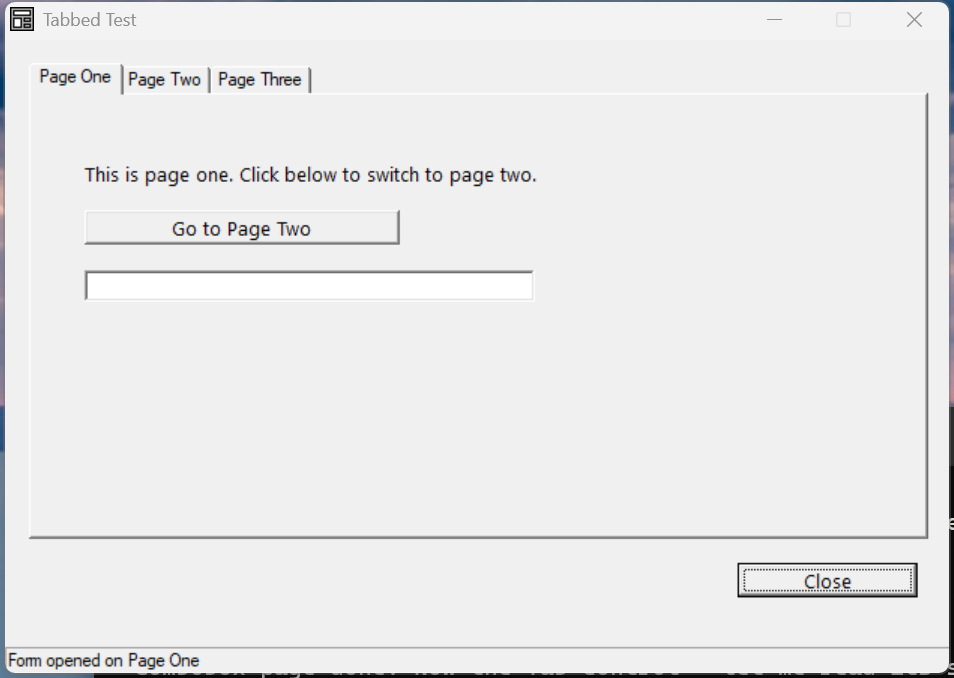
Verified by execution on KCML 06.00.88 (KClient direct mode).
What it demonstrates
- Defining tab pages as sub-properties of the
.tabbed$control (.TabOne,.TabTwo,.TabThree). - Attaching a control to a page with
.Parent=.tabNameand.Page=.TabN. - Switching page in code with
.tabMain.TabTwo.SetFocus(). - Reacting to a page becoming active with the per-page
Enter()event.
The program
01000 REM test_tabbed - .tabbed$ control with 3 tab pages
    : DIM result, msg$80, switch_count
    : switch_count = 0
01010 - DEFFORM TabbedTest()=\
       {.form,.form$,.Style=0x50c000c4,.Width=420,.Height=260,.Text$="Tabbed Test",.Id=1024},\
       {.btnClose,.button$,.Style=0x50010001,.Left=325,.Top=215,.Width=80,.Height=14,.Text$="Close",.Id=1,.Font=.SegoeCtl},\
       {.tabMain,.tabbed$,.Style=0x500100c0,.Left=10,.Top=10,.Width=400,.Height=195,.Id=1000,\
            .TabOne={.Text$="Page One"},\
            .TabTwo={.Text$="Page Two"},\
            .TabThree={.Text$="Page Three"}},\
       {.lblOne,.static$,.Style=0x50000000,.Left=25,.Top=40,.Width=370,.Height=14,.Text$="This is page one.",.Id=2001,.Parent=.tabMain,.Page=.TabOne,.Font=.SegoeCtl},\
       {.btnOneToTwo,.button$,.Style=0x50010000,.Left=25,.Top=60,.Width=140,.Height=14,.Text$="Go to Page Two",.Id=2002,.Parent=.tabMain,.Page=.TabOne,.Font=.SegoeCtl},\
       {.chkTwo,.checkbox$,.Style=0x50010002,.Left=25,.Top=60,.Width=200,.Height=14,.Text$="A checkbox on page two",.Id=3002,.Parent=.tabMain,.Page=.TabTwo,.Font=.SegoeCtl},\
       {.paneStatus,.status$,.Width=420,.Style=0x50000000,.Text$="Ready"},\
       {.SegoeCtl,.dlgfont$,.Name$="Segoe UI",.Size=10}
    :     + DEFEVENT TabbedTest.tabMain.TabTwo.Enter()
    :         switch_count = switch_count + 1
    :         .paneStatus.Text$ = $PRINTF("TabTwo.Enter (switch #%d)", switch_count)
    :     END EVENT
    :     + DEFEVENT TabbedTest.btnOneToTwo.Click()
    :         .tabMain.TabTwo.SetFocus()
    :     END EVENT
    : FORM END TabbedTest
01020 result = TabbedTest.Open()
    : $END
How it works
Pages are sub-properties. The tab pages are declared inside the .tabbed$
definition as .TabOne={.Text$="Page One"}, etc. The .Text$ is the tab caption.
Assigning controls to pages. Every control that belongs on a tab carries two
extra properties: .Parent=.tabMain (which tab control) and .Page=.TabOne
(which page). Controls without them sit on the form itself, outside the tabs —
note how Close stays visible on every page.
Switching in code. Call .tabMain.TabN.SetFocus() to move to a page
programmatically (here the "Go to Page Two" button does exactly that). The user
can also click the tab captions directly.
Per-page Enter(). Each page raises its own Enter() event when it becomes
active — the place to lazily populate a page's controls the first time it shows.
See also
- tabbed — full reference
- Tab page properties