Labels & Status Bar — worked example
Two everyday controls: the static text / label
(.static$) for read-only captions, and the
status bar (.status$) along the bottom of the form
for transient messages. Both are simple, but a couple of details — text
alignment, fonts, and updating from code — are worth seeing.
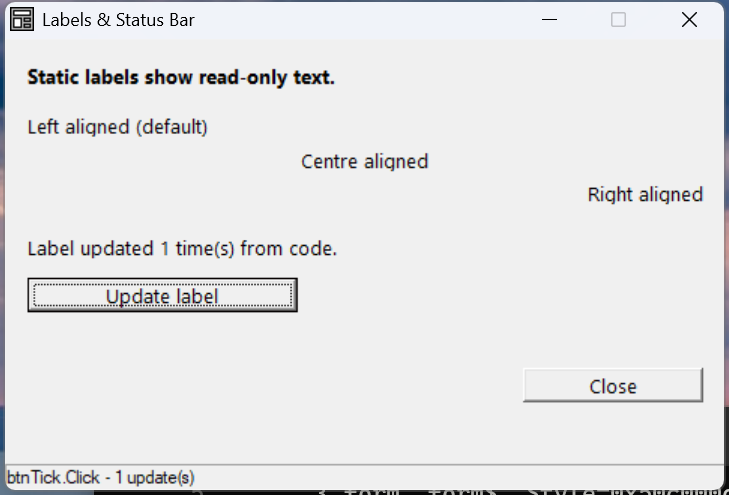
Verified by execution on KCML 06.00.88 (KClient direct mode).
What it demonstrates
- Static labels with left / centre / right alignment via the style flag.
- A bold label using a custom
.dlgfont$. - Updating a label's
.Text$from code at runtime. - Writing messages to the
.status$bar.
The program
01000 REM demo_static - static labels (alignment, fonts) and a status bar
    : DIM result, n
    : n = 0
01010 - DEFFORM StaticDemo()=\
       {.form,.form$,.Style=0x50c000c4,.Width=320,.Height=185,.Text$="Labels & Status Bar",.Id=1024},\
       {.lblTitle,.static$,.Style=0x50000000,.Left=10,.Top=10,.Width=300,.Height=12,.Text$="Static labels show read-only text.",.Id=2000,.Font=.Bold},\
       {.lblLeft,.static$,.Style=0x50000000,.Left=10,.Top=30,.Width=300,.Height=10,.Text$="Left aligned (default)",.Id=2001,.Font=.Reg},\
       {.lblCentre,.static$,.Style=0x50000001,.Left=10,.Top=44,.Width=300,.Height=10,.Text$="Centre aligned",.Id=2002,.Font=.Reg},\
       {.lblRight,.static$,.Style=0x50000002,.Left=10,.Top=58,.Width=300,.Height=10,.Text$="Right aligned",.Id=2003,.Font=.Reg},\
       {.lblShow,.static$,.Style=0x50000000,.Left=10,.Top=80,.Width=300,.Height=10,.Text$="Click the button to update this label.",.Id=2004,.Font=.Reg},\
       {.btnTick,.button$,.Style=0x50010000,.Left=10,.Top=98,.Width=120,.Height=14,.Text$="Update label",.Id=2010,.Font=.Reg},\
       {.btnClose,.button$,.Style=0x50010001,.Left=230,.Top=135,.Width=80,.Height=14,.Text$="Close",.Id=1,.Font=.Reg},\
       {.paneStatus,.status$,.Width=320,.Style=0x50000000,.Text$="Ready"},\
       {.Bold,.dlgfont$,.Name$="Segoe UI",.Size=10,.Bold=1},\
       {.Reg,.dlgfont$,.Name$="Segoe UI",.Size=10}
    :     + DEFEVENT StaticDemo.btnTick.Click()
    :         n = n + 1
    :         .lblShow.Text$ = $PRINTF("Label updated %d time(s) from code.", n)
    :         .paneStatus.Text$ = $PRINTF("btnTick.Click - %d update(s)", n)
    :     END EVENT
    : FORM END StaticDemo
01020 result = StaticDemo.Open()
    : $END
How it works
Alignment is in the style flag. A static defaults to left-aligned
(0x50000000). Add 1 for centre (0x50000001) or 2 for right
(0x50000002) — these are the standard SS_CENTER / SS_RIGHT bits.
Fonts. Define a .dlgfont$ (e.g. .Bold with .Bold=1) once, then point any
control at it with .Font=.Bold. Reusing named fonts keeps a form consistent.
Updating at runtime. Both .static$ and .status$ expose .Text$ — assign
to it any time to change what's shown. Labels are the usual place to display
computed results; the status bar suits brief "what just happened" messages.
Status bar. A .status$ control docks along the bottom of the form
automatically — you don't position it with Left/Top. Set its .Width and
write to .Text$.