Rich Edit — worked example
A rich edit (.richedit$) is a multi-line editor
with formatting — bold, italic, underline, bullets, indents and alignment — shown
on a toolbar above the text area. Use it for notes, descriptions, or any
free-form formatted text.
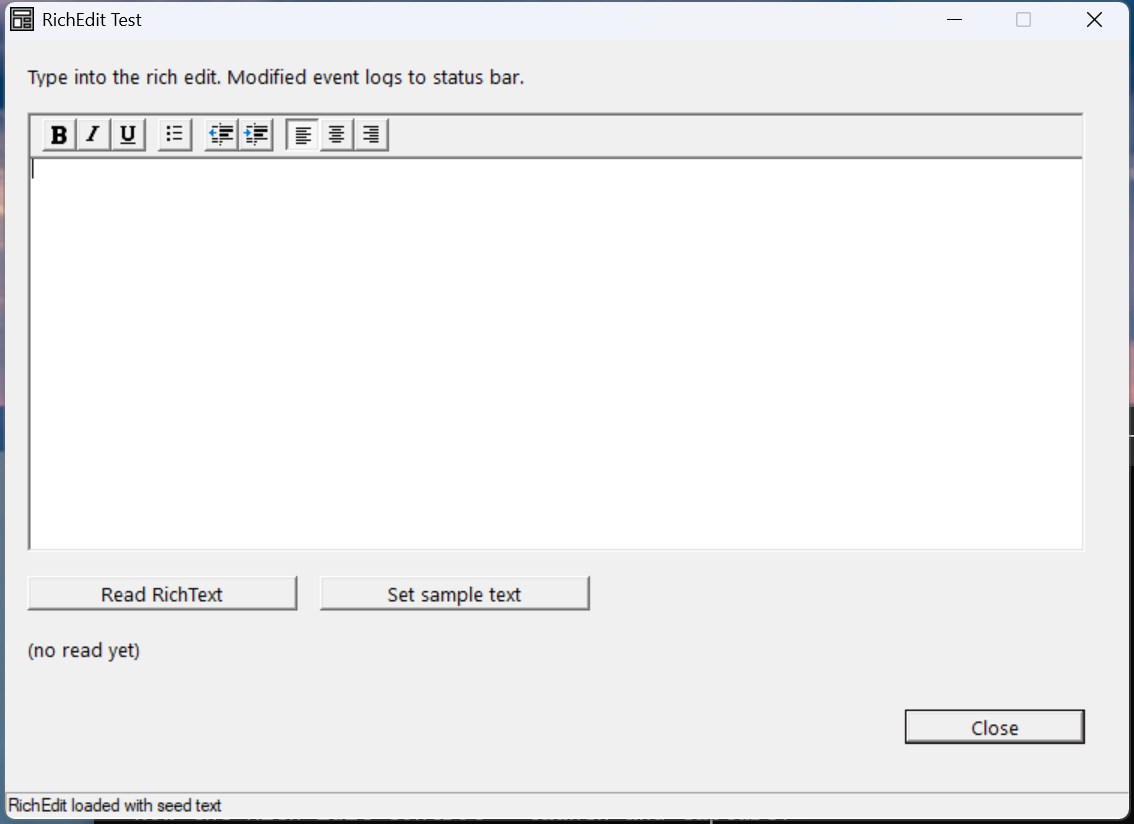
Verified by execution on KCML 06.00.88 (KClient direct mode).
What it demonstrates
- A
.richedit$with the formatting toolbar (style0x50a11044). - Reading and writing content via
.RichText$. - The
Modified()event, which fires as the user edits.
The program
01000 REM test_richedit - rich text editor
    : DIM result, msg$200, rt$2000
01010 - DEFFORM RichTest()=\
       {.form,.form$,.Style=0x50c000c4,.Width=500,.Height=320,.Text$="RichEdit Test",.Id=1024},\
       {.lblInfo,.static$,.Style=0x50000000,.Left=10,.Top=10,.Width=470,.Height=10,.Text$="Type into the rich edit. Modified event logs to status bar.",.Id=2000,.Font=.SegoeCtl},\
       {.rich1,.richedit$,.Style=0x50a11044,.Left=10,.Top=30,.Width=470,.Height=180,.Id=2001},\
       {.btnRead,.button$,.Style=0x50010000,.Left=10,.Top=220,.Width=120,.Height=14,.Text$="Read RichText",.Id=2002,.Font=.SegoeCtl},\
       {.lblOut,.static$,.Style=0x50000000,.Left=10,.Top=245,.Width=470,.Height=20,.Text$="(no read yet)",.Id=2004,.Font=.SegoeCtl},\
       {.btnClose,.button$,.Style=0x50010001,.Left=400,.Top=275,.Width=80,.Height=14,.Text$="Close",.Id=1,.Font=.SegoeCtl},\
       {.paneStatus,.status$,.Width=500,.Style=0x50000000,.Text$="Ready"},\
       {.SegoeCtl,.dlgfont$,.Name$="Segoe UI",.Size=10}
    :     + DEFEVENT RichTest.btnRead.Click()
    :         rt$ = .rich1.RichText$
    :         .lblOut.Text$ = $PRINTF("Length=%d first 80 chars=[%s]", LEN(RTRIM(rt$)), STR(rt$,1,80))
    :     END EVENT
    :     + DEFEVENT RichTest.rich1.Modified()
    :         .paneStatus.Text$ = "rich1.Modified fired"
    :     END EVENT
    : FORM END RichTest
01020 result = RichTest.Open()
    : $END
How it works
The toolbar comes from the style. Style 0x50a11044 includes the formatting
toolbar and word-wrap. The user gets bold/italic/underline, bulleting, indenting
and paragraph alignment for free.
Content is RTF. .RichText$ holds the editor content as RTF (Rich Text
Format), including the formatting codes. Read it after editing to persist the
formatted text; assign valid RTF to restore it.
Verified gotcha: assigning a plain string (no RTF header) to
.RichText$did not display in testing — the control parses its content as RTF. To seed display text reliably, assign well-formed RTF, or let the user type. TheModified()event still fires correctly on edits.
Modified(). Fires when the contents change — use it to enable a Save button
or flag unsaved changes.
See also
- richedit — full reference
- Edit control worked example — single-line plain text