Gauge / Progress Bar — worked example
A gauge (.kcmlgauge$) is a progress bar. Set its
range once, then update .Position as work proceeds — handy for long imports,
report runs, or any batch operation.
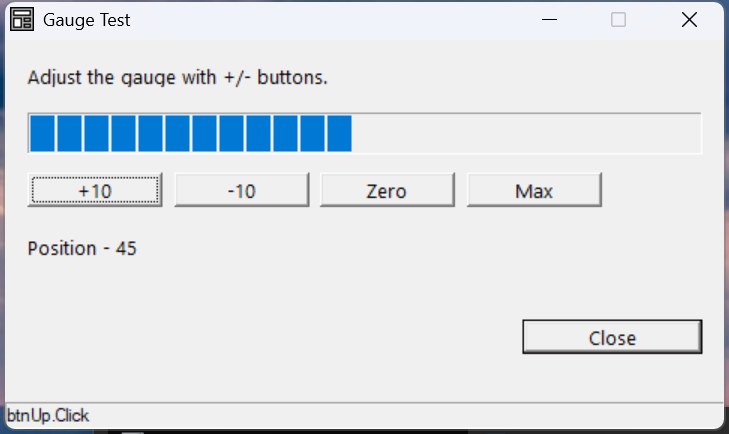
Verified by execution on KCML 06.00.88 (KClient direct mode).
What it demonstrates
- Setting the gauge's
.Rangeat definition and its starting.PositioninEnter(). - Moving the bar by reading and writing
.Position. - Clamping the value so it stays within
0..Range.
The program
01000 REM test_gauge - progress bar with +/- buttons
    : DIM result, msg$60
01010 - DEFFORM GaugeTest()=\
       {.form,.form$,.Style=0x50c000c4,.Width=320,.Height=160,.Text$="Gauge Test",.Id=1024},\
       {.lblInfo,.static$,.Style=0x50000000,.Left=10,.Top=10,.Width=300,.Height=10,.Text$="Adjust the gauge with +/- buttons.",.Id=2000,.Font=.SegoeCtl},\
       {.gauge1,.kcmlgauge$,.Style=0x50010000,.Left=10,.Top=30,.Width=300,.Height=17,.Id=2001,.Range=100},\
       {.btnUp,.button$,.Style=0x50010000,.Left=10,.Top=55,.Width=60,.Height=14,.Text$="+10",.Id=2002,.Font=.SegoeCtl},\
       {.btnDown,.button$,.Style=0x50010000,.Left=75,.Top=55,.Width=60,.Height=14,.Text$="-10",.Id=2003,.Font=.SegoeCtl},\
       {.btnMax,.button$,.Style=0x50010000,.Left=205,.Top=55,.Width=60,.Height=14,.Text$="Max",.Id=2005,.Font=.SegoeCtl},\
       {.lblVal,.static$,.Style=0x50000000,.Left=10,.Top=80,.Width=300,.Height=10,.Text$="Position - 25",.Id=2010,.Font=.SegoeCtl},\
       {.btnClose,.button$,.Style=0x50010001,.Left=230,.Top=115,.Width=80,.Height=14,.Text$="Close",.Id=1,.Font=.SegoeCtl},\
       {.paneStatus,.status$,.Width=320,.Style=0x50000000,.Text$="Ready"},\
       {.SegoeCtl,.dlgfont$,.Name$="Segoe UI",.Size=10}
    :     + DEFEVENT GaugeTest.Enter()
    :         .gauge1.Position = 25
    :     END EVENT
    :     + DEFEVENT GaugeTest.btnUp.Click()
    :         IF .gauge1.Position < 100 THEN .gauge1.Position = .gauge1.Position + 10
    :         .lblVal.Text$ = $PRINTF("Position - %d", .gauge1.Position)
    :     END EVENT
    :     + DEFEVENT GaugeTest.btnDown.Click()
    :         IF .gauge1.Position > 0 THEN .gauge1.Position = .gauge1.Position - 10
    :         .lblVal.Text$ = $PRINTF("Position - %d", .gauge1.Position)
    :     END EVENT
    :     + DEFEVENT GaugeTest.btnMax.Click()
    :         .gauge1.Position = 100
    :         .lblVal.Text$ = "Position - 100"
    :     END EVENT
    : FORM END GaugeTest
01020 result = GaugeTest.Open()
    : $END
How it works
Range and Position. .Range=100 sets the full-scale value at definition;
.Position is the current fill (0..Range). Writing .Position redraws the bar
immediately.
Driving it from a loop. In real use you set .Position from inside a
processing loop — e.g. .gauge1.Position = INT(done * 100 / total). If the loop
is tight and the bar appears not to repaint, flush the form (.form.Flush /
the form's redraw) so the UI updates between iterations.
Clamp your updates. The +10 / -10 handlers guard with IF so .Position
never exceeds the range or drops below zero.
See also
- kcmlgauge — full reference